

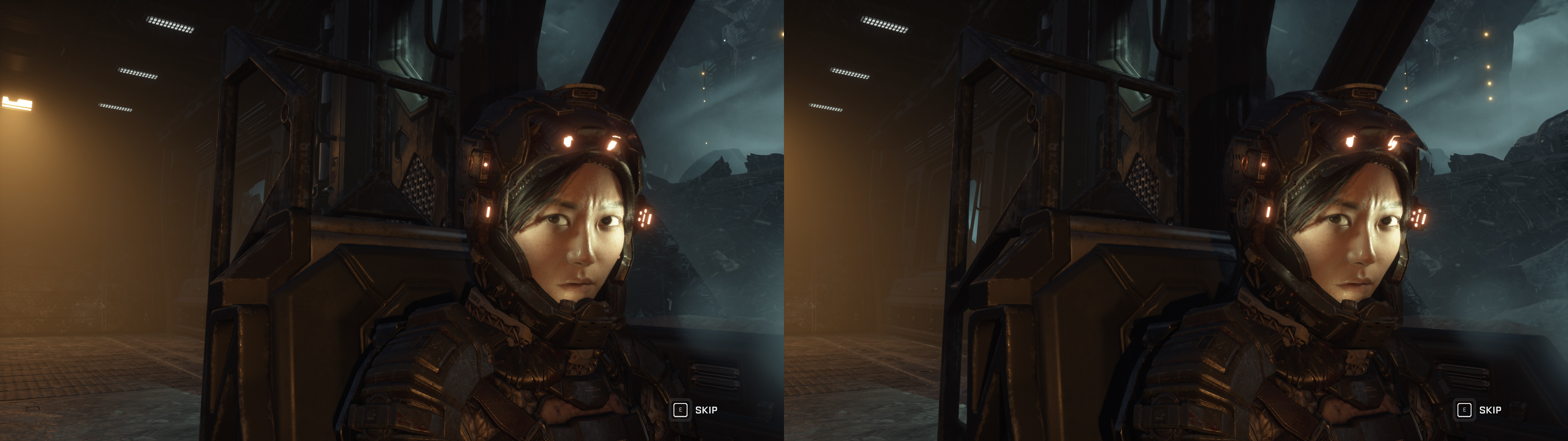
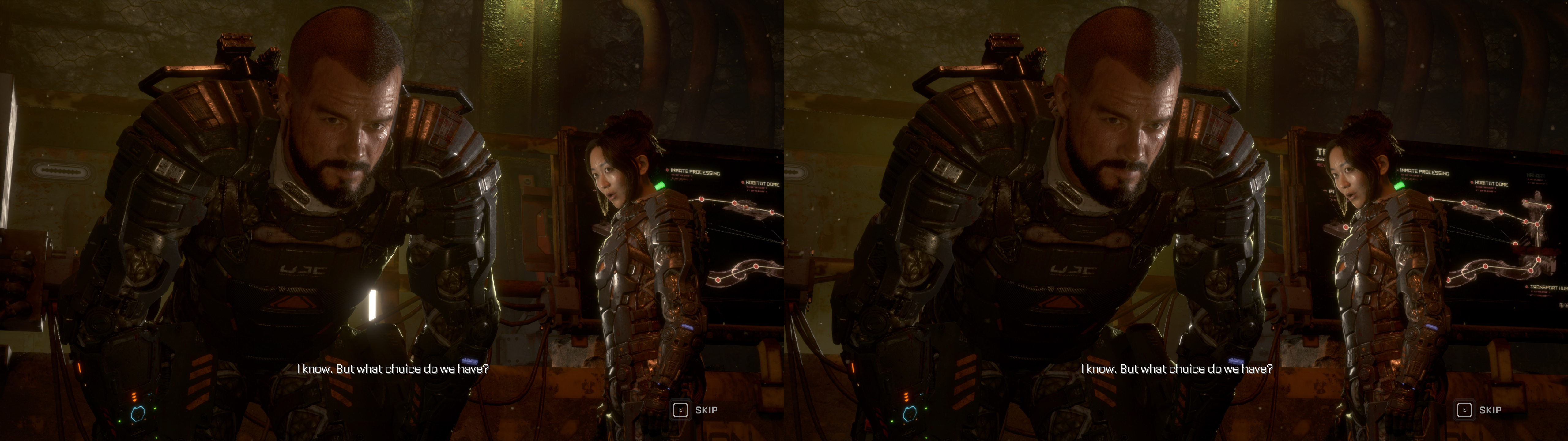


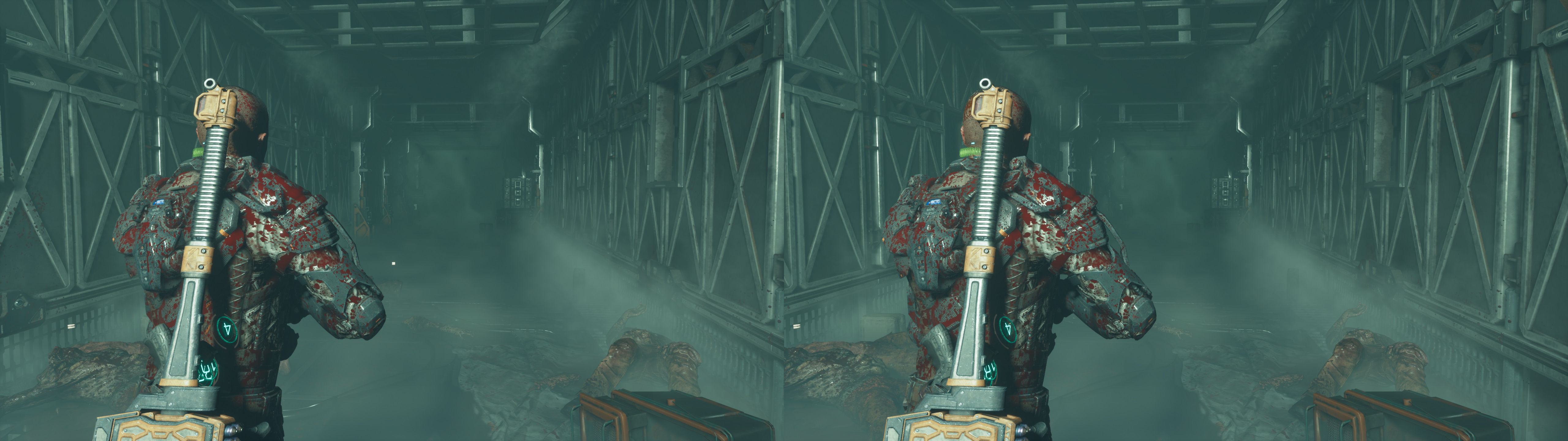
geo-11 fix for The Callisto Protocol, using the ingame DX11 option. This uses the UE4 universal fix as the base (thanks to currently Losti and originally DHR).
Update (2024-04-29): fixed a pair of lighting shaders in a small hallway. Better handling of crosshair depth states, now with support for medium textures. Downgraded geo-11 version to v0.6.164 because of mouse cursor issues.
Fixed (compared to the universal fix)
- Haloing issues.
- Temporal effects.
- One-eye issues for particles and blood.
- Screen space reflections (a small tweak to a regex).
- Some lighting shaders.
- Some specular reflections.
- Some lighting clipping.
- Motion blur.
- Crosshairs at dynamic depth.
Installation
- geo-11 (with build v0.6.164): download this file and extract its contents in the "The Callisto Protocol\TheCallistoProtocol\Binaries\Win64" folder, where "TheCallistoProtocol-Win64-Shipping.exe" is. Remember to edit "d3dxdm.ini" to change your "direct_mode" to the output you need.
Installation
- geo-11 (with build v0.6.164): download this file and extract its contents in the "The Callisto Protocol\TheCallistoProtocol\Binaries\Win64" folder, where "TheCallistoProtocol-Win64-Shipping.exe" is. Remember to edit "d3dxdm.ini" to change your "direct_mode" to the output you need.
- Run the game and set it to DX11 in the options if it wasn't done before. Alternatively, launch the game with the "-dx11" (no quotes) launch command on Steam.
Note: for Nvidia 3D Vision users, use the "nvidia_dx11" mode and set "upscaling" to 1 in "d3dxdm.ini".
Warning for nvidia_dx11 users only: after you exit the game, the game process will remain stuck, consuming one CPU core. You need to use the task manager to kill the process, or stop the game through Steam, which should show it's still running.
Warning: do not use FSR or internal resolution percentages. They make autoconvergence stop working.
Hotkeys
- F1: static convergence presets (40, 80, 120, 160). 120 by default, but they can only be used if autoconvergence is disabled ("dm_autoconvergence = 0" in "d3dxdm.ini"). I recommend just using autoconvergence.
Hotkeys
- F1: static convergence presets (40, 80, 120, 160). 120 by default, but they can only be used if autoconvergence is disabled ("dm_autoconvergence = 0" in "d3dxdm.ini"). I recommend just using autoconvergence.
- F6: vignette and chromatic aberration toggle. Disabled by default.
Notes
- The game's GPU performance is very variable. For a 2080Ti it may be almost 45fps on the benchmark a 2560x1440 at max settings, but some areas are a lot more demanding than that average.
Notes
- The game's GPU performance is very variable. For a 2080Ti it may be almost 45fps on the benchmark a 2560x1440 at max settings, but some areas are a lot more demanding than that average.
- If you play with mouse an keyboard, make sure a controller is not connected. It can interfered with the mouse movement and prompt keys.
- Autoconvergence is enabled by default. If you want to disable it, set "dm_auto_convergence = 0" in "d3dxdm.ini".
- The game has lots of shaders. The first session in the day may stutter due to shader loading for about two minutes. Following sessions may take a few seconds of stuttering.
If you liked the fix and want to contribute for more future fixes, you can donate to this PayPal account: masterotakusuko@gmail.com
Or you can join my Patreon: https://www.patreon.com/masterotaku

Thanks man for your hard work!!!!
ReplyDeleteWow Thank you so much! Testing it soon.
ReplyDeleteMasterotaku eres un puto genio tío!! Sin palabras!!
ReplyDeleteIMPRESSIVE!!!!
ReplyDeleteSUBLIME!!!
TOTAL CRAZY this game with 3D!!!
I love everything but the sparks and particles literally pop out of the screen and seem to sneak into your eyes!!!!
Nvidia should try this game in 3D to make their face fall off in shame for abandoning their 3D which is the best in the world.
It should be a standard!
Thanks to MasterOtaku for spending his hours and hours to fix the game.
We have our 3D Messi and we should appreciate it!
thanks
ReplyDeleteThanks! Awesome work
ReplyDeleteThank you kindly, appreciate your hard work.
ReplyDeleteLooks amazing, man. You are a goddamn legend. thanks again!
DeleteHello. I got error message out of video memory on my rtx 4090 :) I am trying to play via virtual desktop / quest 3. Error appears after first seconds of intro around 12 GB VRAM loaded. Could it be limitation of an engine? Thanks
ReplyDeleteI didn't try it with virtual desktop, but I tried it briefly with vrscreencap and it worked.
DeleteI never saw that error in the game. I have a 2080Ti, by the way.
Be sure to update your software to latest versions with 4090. You want to latest SteamVR, latest VirtualDesktop, latest Oculus software, and probably latest NVidia driver. There are no scenarios where we would expect to run out of VRAM on 4090, even using VR.
DeleteWill this work if game is in DX12?
ReplyDeleteI mention multiple times in the post that this is only for DX11. geo-11 is exclusively for DX11 games.
DeleteSo, sadly, no ray tracing with it.
Hello, thanks for the fix. How can i setup the config files to use a LG interleaced monitor?
ReplyDeleteAs the installation instructions say:
DeleteRemember to edit "d3dxdm.ini" to change your "direct_mode" to the output you need.
You'll find the line, and you'll find what modes you can use. "interlaced" is among them.
Geo files never work for me it fails to launch. AMD gpu here
ReplyDeleteJust tested this on AMD, and it was working well. Full-SBS output to Viture glasses at 1080p.
DeleteI don't know what I'm doing wrong. I use a 3D projector and want to play it in SBS.
ReplyDeleteThe game also starts in SBS but it is not playable.
There are too many picture errors.
Is my 2080Ti too weak?
Works in sbs but in nvidia_dx11 screen is 2D with splashed lines with working glasses
ReplyDeleteFixed by downgrading drivers from 452.06 to 425.31
DeleteI have now a 4070Ti Super. So the graphics driver 452.06 is no longer supported.
ReplyDeleteWorking and looking great via 3d Fix Manager and Virtual Desktop. Thank you so much for this and your love of 3D.
ReplyDeleteJust noting a successful use of this fix, using Viture 3D glasses. When in stereo mode, the glasses are 3840x1080 and it was working well. Also worth noting this was using an AMD 7900 XT. In game resolution has to be at 1920x1080, but output is Full-SBS from geo-11.
ReplyDeletethanks for reporting!
Deletethe best projector 3D (tab) game so far, better than Silent Hill 2 remake. Thanks
ReplyDeleteI was able to play the game with DX11 a few weeks ago without any problems. Yesterday I tried to start it again, but it crashes. Reinstalling the game did not help. Restoring global settings did not help. Repairing Steam did not help either. Even when I start the game in 2D, it crashes. It only works if I enter -dx12 in the Steam launch options, then the game starts without problems. Inside the game I can switch to DX11, but after restarting it always launches with DX12 again. Entering -dx11 in the launch options or leaving the field empty does not work. It always crashes. I must enter -dx12 in the field to start the game without errors. Did a Windows 11 update cause these problems? I am using a 4070 Ti Super graphics card. I really hope someone can help me.
ReplyDeleteI installed the new graphics driver 581.29. Could the driver be causing these problems?
ReplyDeleteWhen I start the game, there are no problems at first. It's only when this window appears that it crashes: Compiling shaders. Progress: 16%....19%..... At that moment, the game crashes. It only works with: Steam/Launch options/-dx12
ReplyDeleteThe crash happens even in 2D, without geo-11, and only in DX11 mode.
DeleteWe suspect a Windows update broke the game.
The game crashes in 2D and with DX11, even without Geo11. The game only works with DX12. This is a problem because the game offers a choice between DX11 and DX12, so the error needs to be repaired. (Since you can choose between DX11 and DX12 in the game, the bug should be fixed, shouldn't it?)
DeleteJust tested this here, and I get the same results. Crashes at compiling shaders for DX11, in 2D mode. Win10 here, tested both AMD and NVidia GPUs. Crashes for driver 452.06, did not try newer NVidia drivers. Tried Win8 compatibility mode, and still crashes.
DeleteGame was last updated 1.5 years ago, so it's unlikely to be game update. My best guess is a multi-threading problem in the game. Since they removed Denuvo awhile back, I'll try to attach the debugger.
Don't have an answer, but maybe something people can experiment with. If you set the force_cpu_affinity=1 in d3dx.ini, that forces it to use a single core. When I do that, I can launch the game and it will get past the shader compiling stage. Probably not playable this way, performance is terrible. If I then remove the affinity, it still seems to crash after it gets to the home page.
DeleteCan also change affinity to a single core in the Task Manager. Maybe a bit better for experiments, because you can tediously get the game running, then try enabling more cores live.
Might be worth experimenting with CPU corralling, and core management. It's definitely something related to multiple cores. 9800X3D here, and it's possible that tickles this bug.
OK, I figured out an OK solution. For UE4 games, you can pass in command line parameters. Add:
Delete-OneThread
As a parameter, which will force it to use a single core. This is not optimal of course, but UE4 never really used multiple threads effectively anyway. Using a single core I benchmark 100fps on Ultra settings at 1440p with an AMD 9700 XT and AMD 9800X3D.
You're a genius. It really works. I haven’t tested yet whether it’s playable in 3D. I hope it won’t lag too much. I’ll test it soon and get back to you. It’s great that it now starts with DX11. My small PC has a 1660S graphics card and an Intel i5-8400 processor. That way I can test if the same problems occur there.
DeleteDoes it only work with 'OneThread'? What about 'TwoThreads? Does it only work with 1 core? Starting from 2 cores only with DX12?
DeleteWhen I started my small PC and opened the Nvidia Control Panel, I was able to enable 3D even though the 3D driver wasn’t installed. And I had version 576.52 installed. Actually, with this version 3D shouldn’t even be possible without a 3D driver, or how can that be?
DeleteOnly works on -onethread. There aren't other options for UE4, but I tried setting Affinity via the Task Manager for 2 threads, and it still crashed. I don't think this will really affect performance, because both UE4 and DX11 are really single-threaded. As long as you don't need nvidia_dx9 mode for output, the performance should be OK.
DeleteI tested here at 2160p with a Leia display, and get roughly 50 fps at medium settings. It looks terrific. AMD 7900XT GPU, 9800x3D processor, Win10, driver 25.6.1. When using the second card of RTX 2080 with 3D Vision display, driver is 452.06.
How is it possible that it can work with just 1 core? Actually, that should be impossible. 1 core was a thing back in 2006. Today we have 16–24 cores, and The Callisto Protocol is not an old game. I absolutely don’t understand how this should be possible. It can’t be that this game only runs on 1 core, right? Maybe the other cores are also working in the background, or not?
DeleteWhat does this error message mean?
ReplyDeleteError
Couldn't start:
"C:\Program Files (x86)\Steam\steamapps\common\The Callisto
Protocol\TheCallistoProtocol\Binaries\Win64\TheCallistoProtocol-Win64-Shippin
g.exe" TheCallistoProtocol -dx11
CreateProcess() returned 2e4.
Typically that means the game requires Admin privileges. However, I tried running as Administrator here and it still crashed.
DeleteI removed -dx11. Still, I get the error message:
ReplyDeleteError
Couldn't start:
"C:\Program Files (x86)\Steam\steamapps\common\The Callisto
Protocol\TheCallistoProtocol\Binaries\Win64\TheCallistoProtocol-Win64-Shippin
g.exe" TheCallistoProtocol
CreateProcess() returned 2e4.
With -dx12 there is no improvement either:
ReplyDeleteCouldn't start:
"C:\Program Files (x86)\Steam\steamapps\common\The Callisto
Protocol\TheCallistoProtocol\Binaries\Win64\TheCallistoProtocol-Win64-Shippin
g.exe" TheCallistoProtocol -dx12
CreateProcess() returned 2e4.
@bo3b
ReplyDeleteSo you're having the same problems as me :(
Will someone look into this issue? If 'The Callisto Protocol' is having problems with this, then many other DX11 games will likely have problems too. I uninstalled the last Windows 11 update, but that didn't help. I last played the game in April, and everything worked fine back then. If there's no solution, I guess I'll have to install Windows 10, but I hope someone finds a fix for it. There has to be a way. Shouldn't the game developers be looking into this? The game should run fine with DX11 on Windows 11, right? This must be a bug.
ReplyDeleteUnlikely anyone other than us will look into it. It doesn't seem like the studio is going to put more effort into it- although it's definitely their bug. It's not related to Win11, I get the same problems on Win10.
DeleteI'm not sure what changed. I played in January, and it was working fine after getting past the shader compile step, and definitely did not crash in 2D. Game has not been updated since then, SteamDB says it's same. I'm running same driver 452.06 on the same video RTX 2080 video card. However, I did build a new computer since then, and am running a 9800X3D now instead of Intel.
Don't know. All we can do is experiment and try to narrow it down. If I get a chance I'll try to fire up an Intel machine as a check.
Hi bo3b, I was still playing the game in 3D in April without any problems. I installed Windows 11 in March 2025. The graphics driver for my 4070Ti Super was always up to date. Are you 100% sure it's not due to a Windows 11 update or the new graphics driver 581.29? I'll ask my father; maybe he has a PC with an Intel processor. Or I'll ask my sister and her boyfriend, then I might be able to test today if it works with an Intel processor. I'm excited about the result. Maybe I'll need a system with Intel again soon. Thank you, and I hope you stay on it and look for a solution.
DeleteI did some more experiments, including firing up my old PC with my old Win10 installation. Even with only January Win10 updates I still get the crash. Less likely to be an OS update that caused it. I can't narrow anything down.
DeleteHowever, it doesn't really matter. The -onethread is perfectly workable, and I tested the performance to see whether it matters. Short story is that it doesn't turn the dial enough to worry about. Here are my salient performance tests:
Old OS, old i7-9700K RTX 2080 driver 566.36 - still crashed:
-onethread -dx11 1440p, 2D: 50 fps
-dx12 1440p, 2D: 81 fps
AMD 9800x3D RTX 2080, no geo-11, 2D:
-d3d12 -fullscreen -resx=2560 -resy=1440: 64 fps
-onethread -d3d11 -fullscreen -resx=2560 -resy=1440: 59 fps
-onethread -d3d11 -windowed -resx=1920 -resy=1080: 78 fps *100% GPU
AMD 9800x3D, 7900XT, 2D:
-onethread -d3d11 -borderless -resx=3840 -resy=2160, no geo-11: 62 fps
-d3d12 -borderless -resx=2560 -resy=1440, no geo-11: 67 fps *probably 2160p
AMD 9800x3D, 7900XT, Stereo:
-onethread -d3d11 -resx=2560 -resy=1440, stereo on: 45 fps
If we use the DX12 benchmark as best theoretical- there isn't enough difference in performance to matter, and I'm always going to use a perfect masterotaku fix as the best experience. I'm playing at 1440p upscaled to 2160p by geo-11, and get a fully playable 50fps with my hardware on Ultra.
Thank you for this information. Did you also test it on a PC with an Intel CPU? Where can I always get the best fix from masterotaku? Are you playing on a 3D monitor? With my 3D 4K projector I can only run up to 1920p in SBS or TAB mode. Is there any other way around that? Do you always play with Geo-11? Why not use UEVR + VRto3D or RealVR + VRto3D? I’d really like to hear about your experience This is very helpful for me.
DeleteI am using this processor: AMD Ryzen 5 5600X. Can someone test this with an Intel processor? If it works with an Intel CPU, I would switch my processor. Is it worth installing Windows 10, or does it have the same problems?
ReplyDeleteI tested it on this garbage Acer laptop with an Intel processor and Nvidia GPU, and it doesn't help the crash. Seems unrelated. I don't know what might have changed to make this happen now, when it was working earlier.
DeleteI think the -onethread is the only way for now.
I like to write things down. For future reference, things that I tried that had no effect on the crash:
Intel CPU, NVidia GPU, AMD GPU, AMD CPU, game installed on spinning disk, HAGS On/Off, Nvidia Driver 452.06, APP_COMPAT_SHIM=1, windowed/fullscreen, 1280x720 resolution, all low settings, two-thread Affinity, no overlays, EpicGameStore version.
It's definitely multi-threading related, but I haven't been able to pinpoint what changed. Driver is same as January, and game has not changed. I've built a new clean Win10 setup though, and new hardware.
Hey bo3b,
DeleteI'm trying to get this working with UEVR + VRto3D. This should allow The Callisto Protocol to work with DX12. I've tested other games, but I can't seem to get it right. In SteamVR (Headset Display), I get an SBS (side-by-side) image, but the game itself only runs in fullscreen and 2D.
I have 102 games in my VRto3D folder. Subnautica.exe_config.json is one of them. When I start the game, I get this message: "Warning: Subnautica does not appear to be an Unreal Engine title."
Can you help me so I can test UEVR + VRto3D as well? If that works, perhaps "Sons of the Forest" could also work with it. I'm excited to find out!
Worth trying if you'd prefer the VR experience, but it will be fiddly to set up and get running. Not sure what your output hardware is, but if it's 3D Vision you'll need the VRto3D and WibbleWobble too, both of which will eat a bit of performance. Biggest difference might be in better min frame rates for DX12, but that's hard to measure.
DeleteThe SBS output from SteamVR is what you expect to see, that's what UEVR generates. Then VRto3D will convert that SBS to 3D formats like Real/Viture glasses. Can also convert to 3D Vision with WibbleWobble which uses the SBS. Subnautica is a Unity game, it's not going to work with UEVR. You can check pcgamingwiki to see what a game uses. Just checking Sons of the Forest for example- Unity 2022. This is not a particularly great spot to get help, you are probably better off to talk with more people on mtbs3d forums, or the Discord.
If you get it working, please let us know, always good to know about more options.
I’m using a 3D projector (BenQ TK710) and I want to play games in SBS or TAB. Did you check Sons of the Forest? I don’t know Unity 2022. Did Sons of the Forest work in 3D? I’m active on mtbs3d and I’m in contact with oneup03, but he couldn’t help me with my problem. My games always crash.
DeleteI played The Callisto Protocol with “-onethread.” It is playable, but in my opinion, it stutters more than before when I last played it in April. The game is supposed to work with DX12. Wouldn’t that be the best option? Then I could remove “-onethread” and the game should run more smoothly in 3D.
I haven’t dealt with the 3D topic for a long time, so it’s hard to understand everything. Geo-11, UEVR + VRto3D, RealVR + VRto3D, NoMoreFlat + VRto3D. I’m losing track of how I should actually play the games in 3D. With DX11 or with DX12?
I have now installed games that I want to test in 3D: Alan Wake 2, Elden Ring, Ghost of Tsushima, Returnal, Senua’s Saga: Hellblade II, Cyberpunk 2077, Horizon Zero Dawn™ Remastered. A little help would be useful for testing. Thanks.
Yeah, it's pretty confusing and complicated these days, although we also have more 3D gaming and improved hardware available now than ever. As a general idea, nothing DX12 is going to work, outside of UEVR. HelixMod/geo-11 is currently only DX9 and DX11. So it really depends upon the game, your output hardware, and whether there is a working fix or not.
DeleteBest to start with output hardware, because it determines what you can do. With your TAB output to a projector, you need either geo-11 with a fix, or UEVR+VRto3D. DX9 isn't going to work, there is no TAB or SBS output path outside of Katanga+VRto3D, and that'll be tricky.
The Forest was a Unity game and has an excellent fix, but that won't work on Sons of the Forest because the Unity version changed. Nobody has looked at fixing that game yet, so I don't think you have any options there outside of raw geo-11 generating stereo. You might be able to turn off shadows or tweak it to make it playable. I think the Unity Universal Fix will not work there because the 2022 version of Unity changes all the shaders. Best approach is to try stuff though- lots of stuff that seems logical doesn't work in practice. Like DX12 for Callisto doesn't matter.
The details matter- don't just glaze over and stop thinking. UEVR for example stands for UnrealEngineVirtualReality. Does that sound like it will work on a Unity game? Modding can be a drag, no question, but we get to play stuff that literally no one else sees.
I've got VR headsets too, so I tested UEVR 1.05 here with Callisto, and it's working well. Injects OK with either DX12 or onethreadDX11. Shows up in VR. Needs SyncedSequential to fix bad effects. Runs at roughly the same speed as regular 3D. I'm getting:
-d3d12 -fullscreen -resx=2560 -resy=1440, UEVR, native: 31 fps
-d3d12 -fullscreen -resx=2560 -resy=1440, UEVR, synced sequential: 55 fps
-onethread -d3d11 -fullscreen -resx=2560 -resy=1440, UEVR, synced sequential: 51 fps
Looks pretty good, but it's a bit grim for an actual VR experience, that 55 fps really hurts in VR and would need more tuning like lowering supersampling, output resolution, or other VR stuff.
It finally works now. It wasn’t my PC causing the problem. Black Myth Wukong was crashing because of the UEVR injector. I had to download an older version of UEVR. Now I can start the game without crashes. The only other thing I had to change was the desktop resolution to 1920x1080. After that, I was able to activate SBS on my 3D projector.
DeleteI tested several games, starting with Black Myth Wukong. The 3D effect was very good, but there were still many rendering issues, and the subtitles were hard to read. After the fight, when Chapter 1 began, the game crashed with the error message: graphics driver crash.
When I try to import the Elden Ring profile in UEVR, I get this message: “Warning: eldenring does not appear to be an Unreal Engine title.” With another game, I received the following message: “DLL Warning – The selected config file includes a DLL (plugin), which may execute actions on your system. Only import configs with DLLs from trusted sources to avoid potential risks. Do you still want to proceed with the import?”
I’m happy that the games now start without crashes, but there are still some problems. I change Depth and Conv using Ctrl+F3/4 and Ctrl+F5/6. Is there a fixed value for these settings for each game? It’s a bit complicated to adjust them correctly. In Hellblade 2, I had Depth: 0.035 and Conv: 6.535. It looked quite good, but I think not perfect yet.
What I find very difficult is knowing which graphics settings need to be changed. Modern games have so many options that it’s overwhelming. What absolutely must be turned off to make the game run correctly in 3D? For example, in Black Myth Wukong, the clouds during the first battle were rendered incorrectly. I don’t think that can be fixed with Depth and Conv adjustments. So what causes the clouds to be displayed incorrectly in 3D?
ReplyDeleteIs there a video where everything is explained in detail? I’ve been trying for so many days now without success, without a result.
I have a few questions:
What does WibbleWobble mean? Do I need it?
Do I need the DLSS.Swapper-1-2-1-0?
What resolution should I set in the game? The native resolution: 3840x2160 or 1920x1080?
default_config.json – “window_width”: 1920 or 38140?
OpenVR or OpenXR?
I’ve done everything. I put vrto3d here: SteamVR\drivers.
I put vrto3d_profiles here: documents\My Games\vrto3d
I start:
1. SteamVR
2. The Game
3. UEVRInjector (OpenVR)
I select the game – Inject – and The game doesn’t start in SBS. Only SteamVR shows an SBS image.
What am I doing wrong?